

 Salesforce
 HubSpot
 Claude
.png?width=58&height=58&name=Frame%202087327944%20(1).png) GA4
GA4
.png?width=58&height=58&name=Frame%202087327944%20(2).png) Marketo
Marketo
.png?width=58&height=58&name=Frame%202087327944%20(3).png) Audit Fox
Audit Fox
 Services
.png)
Story time: Not too long ago, a VP RevOps came to us with a bit of a mess.
Her team had turned on every Breeze AI feature the week it became available. Can’t blame them: most folks serious about GTM AI tend to experiment with everything. Plus, many Breeze Studio capabilities didn’t need credits to use.
But the other side is this: a few weeks in, NONE of it had stuck.
Reps ignored the AI-drafted outreach because it never quite matched how they actually sold. Support tickets kept escalating past an agent nobody had trained on real edge cases. Nobody could point to a single number that had moved.
AND it didn’t help that their HubSpot data quality was questionable.
We ran a Breeze AI assessment to figure out what was actually wrong: no Knowledge Vault, no Brand Voice, nothing grounding any of it.
In other words, every agent was guessing. They'd deployed the specialized stuff first and skipped the groundwork entirely.
The VP RevOps and her team came back to us — this time, the basics were in place and the deployment focus was one feature at a time.
That's the difference between a rollout that sticks and one that goes nowhere.
HubSpot Breeze AI features actually worth turning on
When it comes to HubSpot AI, every team that turns everything on hits the same wall: too many agents, not enough context, no way to tell what's working.
We've built and deployed Breeze AI across enough accounts to know which features earn their place and which ones add noise. Here’s what we recommend.
💡 Recommended before you begin: Know what HubSpot Breeze AI has to offer to GTM and RevOps teams
1. Context layer
Every HubSpot Breeze AI capability you use needs foundational groundwork.
- 'Knowledge Vaults' are reusable repositories of business context. You can pull together files, HubSpot content, CRM objects, and segments into one vault, then attach it to multiple assistants and agents. Build it once, and you don’t have to re-upload the same docs every time
- Brand Voice and Brand Identity give Breeze your organization's writing style and business context. Generated content stops sounding like generic AI output. You'll see this in Customer Agent's tone settings, in content generation, and in content refinement
- Breeze Tools extend what assistants and agents can actually do, across three categories: ‘Get data,’ ‘Generate,’ and ‘Take action.’ Some come from HubSpot, others from third-party apps you've already installed
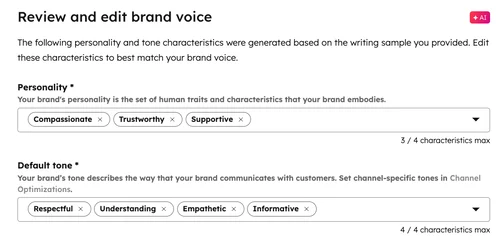
The issue GTM teams face is that, in their eagerness to get Breeze up and running, they skip this groundwork and end up with agents and assistants that suck at what they’re asked to do.
So don’t skip this.
Give every assistant the same context, without repeating yourself
Many teams end up running a ton of assistants and agents running in HubSpot. Without a shared Knowledge Vault, each one starts from scratch. You upload your product docs to one, then re-upload the same docs to the next.
Instead, build the vault once and attach it wherever it's needed. E.g. a support-facing assistant and a sales-facing agent can both pull from the same source of truth, and when that source updates, every assistant using it updates too.
💡 Pro tip: Start with one vault per business function rather than one giant vault for everything. It's easier to manage permissions and spot what's outdated.
Make AI-generated content sound like you, not like a robot
Generic AI output has a tell. It's polished, but it doesn't sound like anyone in particular. Brand Voice on Breeze AI fixes that by giving HubSpot AI your actual writing style to work from.
Once it's configured, you'll see the difference in more than one place. Customer Agent can adopt your Brand Voice instead of a generic personality preset. Content generation and refinement use it too. The output still needs a human pass, but you're editing something that already sounds like you, not rewriting it from the ground up.
💡 Pro tip: Feed ‘Brand voice’ real examples of your best-performing content, in addition to your style guide summary. It picks up tone from actual writing far better than from abstract rules.
Decide what an agent can touch before it can touch anything
Many Breeze Tools fetch information. But many other tools can also create records, update properties, and publish content. These fall under Take Action, and by default, HubSpot asks for approval before one runs.
Keep that default on for anything touching production data, especially early on. Turn it off only for tools you've watched behave correctly, and only on purpose.
💡 Pro tip: Audit which ‘Take action’ tools have approval turned off every quarter. It's easy to disable review during setup and forget it's still off six months later.
2. Breeze Assistant
Breeze Assistant is the conversational layer of HubSpot AI.
Ask it a question, and it answers using available context. Ask it to draft, refine, or summarize something, and it does that too, right inside whatever tool you're already working in.
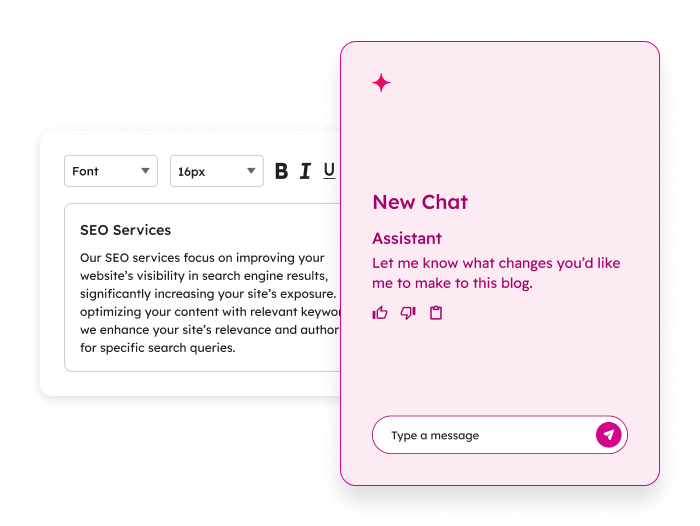
It also builds workflows from plain language. Describe what you want, and Breeze Assistant generates the triggers, actions, and delays, then leaves the workflow inactive until you review it.
This is the most mature entry point into HubSpot AI. It's also the one most teams stop exploring after one quick summary or draft, without realizing how much further it goes.
Get a usable first draft without opening a blank editor
You need an email, a quick page update, or a first pass at some copy. Instead of starting from nothing, ask Breeze Assistant and start from something.
It won't be publish-ready. It'll be far enough along that editing feels faster than writing.
Build or extend a workflow by describing it
Building a workflow manually means dragging actions, wiring branches, and configuring delays one at a time.
Breeze Assistant skips that. Describe what should happen, and it drafts the workflow for you.
You can also use it to extend something that already exists. E.g. you could add a follow-up step, insert a delay, or expand a simple automation into something more complete, all without rebuilding it from scratch.
Get a straight answer instead of digging through a record
Some contacts have months of emails, notes, and call logs attached to them. Reading all of it before a call isn't realistic, and it isn't necessary.
Ask Breeze Assistant to summarize the record, and you get the version worth reading before you pick up the phone.
💡 Pro tip: Ask a specific question rather than a general "summarize this." "What's the status of their last deal?" gets you a sharper answer than "summarize this contact."
3. Content creation
You already know that creating content from scratch, every time, for every channel, doesn't scale. This is the part of HubSpot AI built to fix that.
- Content Generation drafts, rewrites, refines, expands, or shortens content from a prompt, an existing asset, an uploaded file, or a live URL
- Content Remix takes that further: feed it one or several source assets, and it generates multiple formats from them at once, blog posts, social copy, landing pages, images, all pulled from the same source material
- Blog Research Agent works differently. Give it a topic, and it researches sources and generates a full long-form draft on its own. It needs an existing blog to work from and Super Admin setup to activate, and it's newer than the other two, so expect more hands-on review before anything goes live
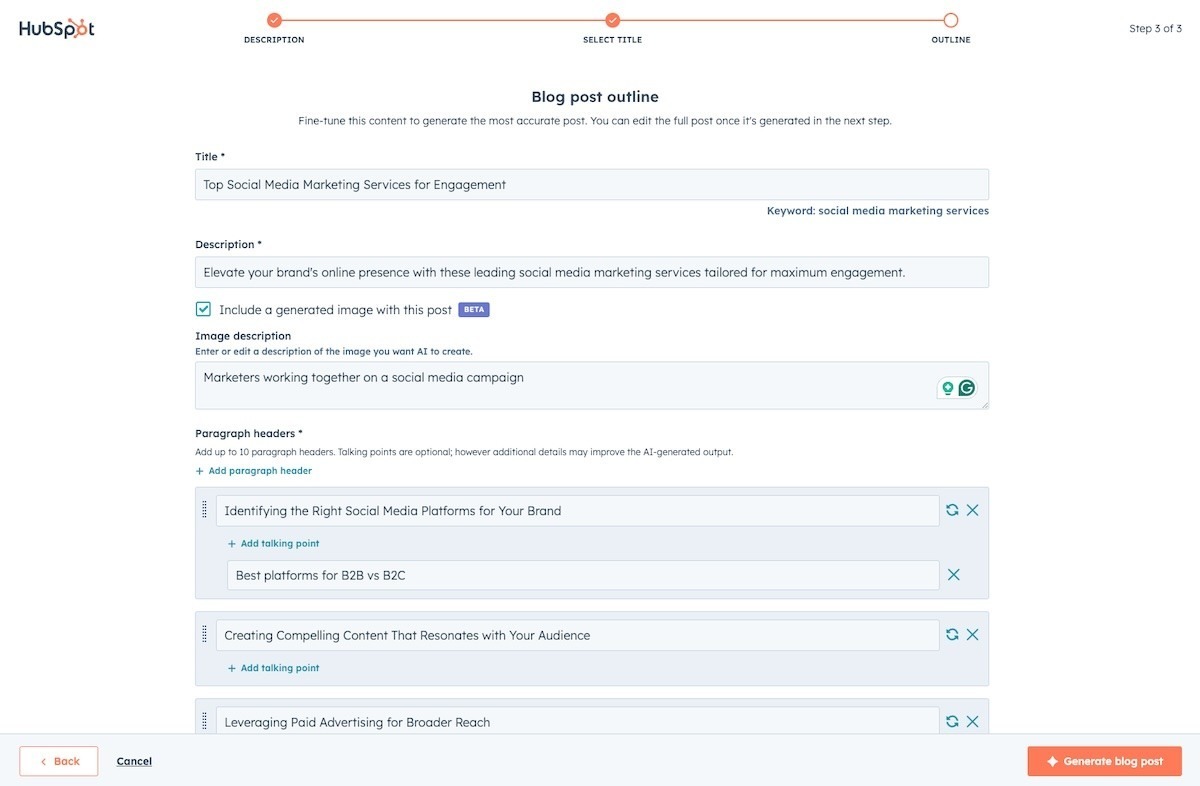
A webinar, a podcast episode, a long blog post: any of these can become five other things without five separate writing sessions. Content Remix takes the source and generates variants across formats in one pass.
You still edit each one. You're just not starting any of them from zero.
Get a research-backed blog draft instead of a blank page
Good blogs across the funnel start with strong research: find sources, check what's already been written, pull together an angle.
The Blog Research Agent does that first pass for you and hands you a draft to work from, surfaced right on the Blog Suggestions tab.
It's still a first draft. Fact-check it, rewrite the parts that sound generic, and make sure it actually reflects how your team thinks about the topic.
💡 Pro tip: Review and either publish or dismiss suggestions regularly. Letting drafts pile up on the Suggestions tab makes it harder to tell what's worth your attention.
Keep a content calendar moving without adding headcount
Content demand usually outpaces the team producing it.
Between Content Generation and Content Remix, one solid source asset can fill several weeks of channel-specific content instead of one blog post and nothing else.
💡 Pro tip: Build a simple source-to-output map before you start remixing (this webinar becomes this social series, this blog becomes this email). Remixing without a plan produces a lot of assets and no coherent campaign.
4. Data Agent and smart CRM automation
CRMs tend to collect messy, unstructured information: free-text form fields, call transcripts, notes nobody standardized.
The Breeze Data Agent turns that into something workflows can actually use. It runs through three capabilities:
- Smart Properties, AI-generated CRM fields that populate themselves based on a prompt
- Smart Actions, which bring that same logic into workflows
- Smart Columns, which add AI-generated columns to reports in Data Studio
A few related workflow actions build on this, including inferring a company's ICP and value proposition, and summarizing a record for downstream use.
Turn a messy form field into something you can filter on
A "tell us about your project" field is useful to a human reading it once. It's useless to a workflow trying to route the lead.
Data Agent can read that free text and classify it, enterprise, SMB, not qualified, then write the result into a property you can actually build logic around.
💡 Pro tip: Start with one high-volume, low-complexity field before rolling this out everywhere. It's easier to validate accuracy on one property than to untangle five at once.
Automatically researching a company before it reaches sales
Someone usually Googles a prospect before the first call: what they sell, who they sell to, what problems they solve.
Data Agent can generate that profile automatically from a company's website and feed it into the workflow, so reps start with context instead of a blank page.
💡 Pro tip: Use the generated ICP and value proposition to branch workflows, not just to inform reps. If the AI flags a company as enterprise software, route it differently than an ecommerce brand.
Standardize inconsistent CRM data without a cleanup project
Every CRM has some version of the same problem: state names entered five different ways, industries spelled inconsistently, values that mean the same thing but don't match.
Data Agent can standardize this at scale through a workflow, instead of a one-time manual cleanup that drifts again in a few months.
💡 Pro tip: Pair this with a workflow trigger on record creation, so new records get standardized going forward instead of only fixing what's already broken.
5. Conversation intelligence and smart deal progression
Sales calls generate a lot of information that usually stays trapped in someone's memory or a scattered note. This pairing turns that into structured, usable CRM data.
Conversation Intelligence transcribes calls, generates AI summaries covering purpose and next steps, tracks sentiment and talk time, and lets you search across transcripts for specific terms.
Smart Deal Progression builds on top of that. It reads the transcript and suggests CRM property updates, action items, and follow-up emails, each one linked back to the exact point in the call that generated it.
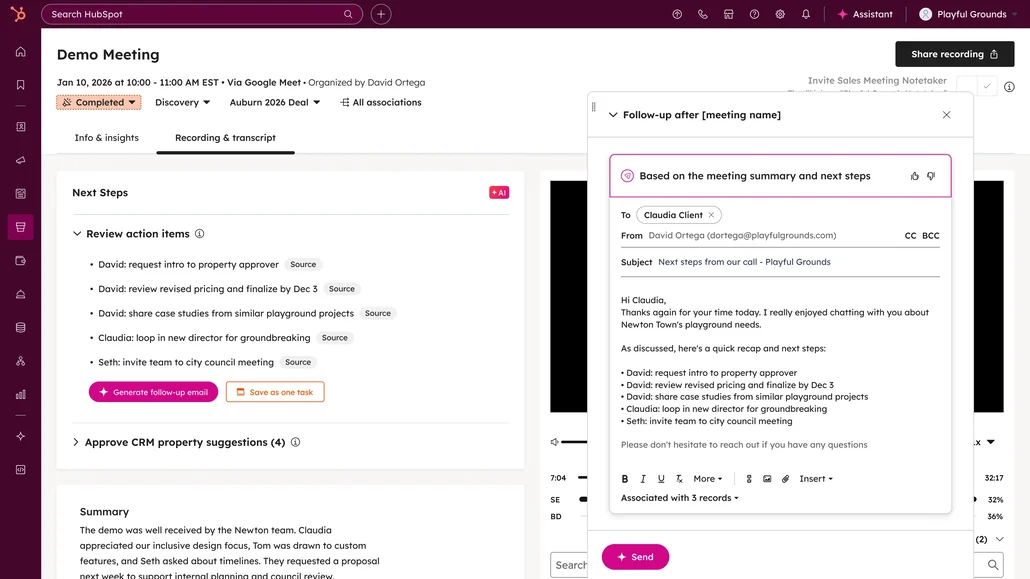
You decide how much of this runs on its own. Some properties can update automatically, others require a rep's approval first, and that split is configurable per property.
Update CRM based on what was actually said
Deal details usually live in someone's head until they get around to updating the record, if they get around to it. Smart Deal Progression reads the transcript and suggests the update directly, with a link back to the moment in the call that supports it.
💡 Pro tip: Leave high-stakes properties (deal stage, close date) on manual approval, and let lower-stakes ones (contact title, company size) update automatically. You get speed where it's low-risk and oversight where it isn't.
Send out a follow-up email the same day
The best time to send a follow-up is right after the call, while the conversation is still fresh.
Smart Deal Progression drafts that email from the transcript itself, recipients, subject, and body included, so a rep is editing something instead of writing it cold.
💡 Pro tip: Check the draft against what was actually agreed on the call before sending. It's a strong first pass, not a substitute for knowing what you promised.
Review pending CRM changes across many deals at once
Opening every deal individually to check for suggested updates doesn't scale past a handful of reps. Bulk recommendation review from the deal index lets you approve or reject changes across multiple deals in one pass instead.
6. Prospecting Agent and Closing Agent
These two agents sit on opposite ends of the same deal. Prospecting Agent works before a deal exists. Closing Agent works once a quote is out.
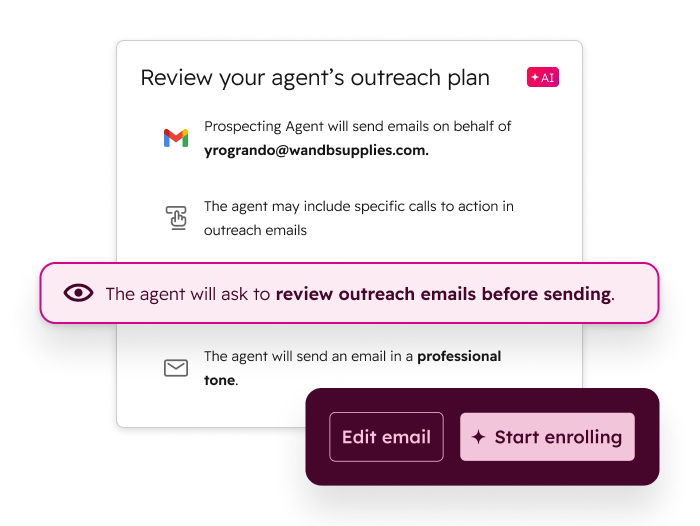
Prospecting Agent researches companies and contacts, prioritizes who's worth reaching out to first, and drafts personalized outreach for reps to review.
Closing Agent answers buyer questions directly inside a HubSpot quote, grounded in uploaded files, knowledge base articles, or public URLs, and hands off to the quote owner or a designated team when it can't answer confidently.
It also responds in the buyer's language and lets you customize its name, avatar, and welcome message.
Walk into a first call already knowing what the company does
Researching a prospect manually means piecing together their website, LinkedIn, and whatever context is already in the CRM.
Prospecting Agent does that first pass, what the company sells, who they sell to, what they might care about, before a rep ever picks up the phone.
Let a buyer get quote questions answered without waiting on the rep
A buyer reviewing a quote at 9pm has questions, and the rep isn't online. Closing Agent answers directly, grounded in the knowledge sources you've attached, and only loops in a human when the question genuinely needs one.
💡 Pro tip: Load your most common quote-stage objections and FAQs into the knowledge source before activating this. The quality of its answers is only as good as what you've given it to work from.
Keep a buyer conversation moving in their own language
A buyer shouldn't need to switch tools or wait for a translated reply. Closing Agent responds in the same language as the quote itself, so this works without extra setup on your end.
💡 Pro tip: Test the welcome message and quick replies from the buyer's side before rolling this out widely. What reads as helpful internally can land as stiff or robotic to someone outside your company.
7. Customer Agent
Breeze Customer Agent is a configurable support agent that answers customer questions.
It uses your approved business content, performs actions through connected APIs, and hands off to a human when it can't resolve something on its own.
- Pulls from knowledge base articles, website pages, uploaded documents, and crawled URLs, and it can retrieve or update approved CRM properties during a conversation
- Deploys across messaging, email, calling, Help Desk, and Inbox, and it comes with built-in reporting: resolution rate, deflection rate, and a running list of questions it couldn't answer
Resolve repetitive questions before they ever reach a human
Password resets, order status, policy questions: these don't need a person.
Customer Agent answers them directly, across whichever channel the customer reached out on, at any hour.
💡 Pro tip: Start with your highest-volume, lowest-complexity questions. Getting those right builds trust in the agent before you hand it anything more nuanced.
Know what your agent still can't answer, and fix it
An agent that never improves stays stuck at day-one quality.
Customer Agent tracks knowledge gaps and coaching opportunities, so you know exactly which questions it's missing and why.
Route the conversations that need a human, to the right human
Not every escalation should land in the same inbox.
Customer Agent supports custom handoff triggers, cancellations, refunds, login issues, each routed to a specific person or team instead of a general queue.
💡 Pro tip: Set up handoff messaging for both available and unavailable states. A customer waiting on a response deserves to know that, instead of wondering if the conversation just stalled.
8. Data enrichment and buyer intent
CRM records go stale fast: outdated titles, missing firmographic details, contacts who changed companies without telling anyone.
Data enrichment keeps records current using HubSpot's own commercial dataset, pulling from public sources, third-party vendors, and web data.
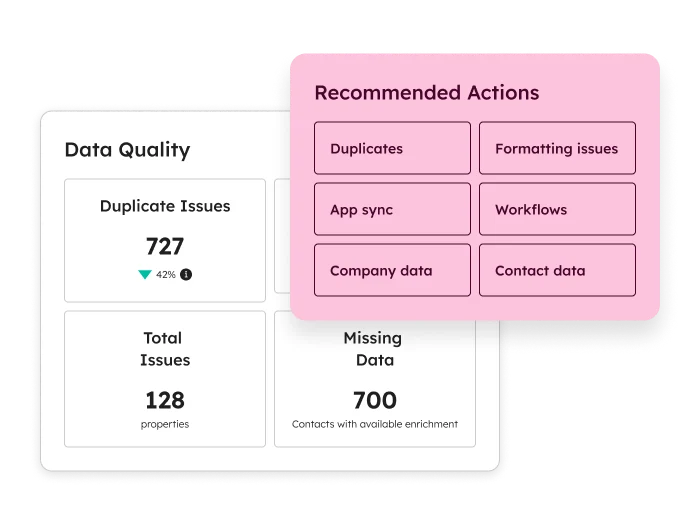
New records get enriched automatically, and existing ones refresh monthly without consuming credits. You can also enrich manually, in bulk, or through a workflow, and choose exactly which properties get filled or overwritten.
Buyer intent insights sit alongside this, surfacing which companies are visiting your site so you can prioritize outreach before they've filled out a single form.
Know who's worth prioritizing before you even reach out
A visitor browsing your pricing page for a week is a different lead than one who bounced after ten seconds. Buyer intent surfaces which companies are showing up on your site, so outreach can start with the ones already paying attention.
💡 Pro tip: Combine buyer intent with your existing lead scoring rather than treating it as a separate signal. A high-intent visitor who also fits your ICP is worth more than either signal alone.
Shorten your forms without losing the data you need
Every extra form field costs you conversions. If commercial data enrichment already knows a visitor's company size and industry, there's no reason to ask for it again.
Segment and score leads on real data
Job title, industry, company size: these matter for segmentation and scoring, but only if they're accurate. Enriched fields give you something more reliable to build audiences and scores around than whatever a lead happened to type in manually.
💡 Pro tip: Re-run scoring models after enrichment settles in for a quarter. Cleaner input data often shifts what "high-quality lead" actually looks like in your funnel.
Breeze AI prerequisites and what to turn on first
Naturally, none of this works well on day one—don’t expect it to.
Before any of it, get the basics enabled: access and permissions, funnel and pipeline data, and company assets—all in your AI settings.
You'll also need Super Admin or Breeze Studio permissions sorted for whoever's configuring these agents going forward.
Beyond settings, two things matter more than the rest: at least one populated Knowledge Vault, and Brand Voice configured. Skip either, and every agent you turn on afterward starts from a weaker position.
If you're picking a starting point, this is the order that works in our experience:
- Knowledge Vault and Brand Voice, first and non-negotiable. Everything downstream depends on this
- Breeze Assistant, because it's the lowest-friction way to get your team using HubSpot AI daily, and it needs almost no setup
- Content Remix, because one source asset turning into several formats is an immediate, visible win for a content team stretched thin
- Data Agent's Smart Properties, starting with one high-volume field, to prove out the CRM automation case before expanding further
Everything else is also worth deploying. It's just worth deploying after these are actually working, not alongside them.